

Understanding Claude for Excel price is essential for analysts, finance teams, and businesses evaluating AI tools inside Microsoft Excel. Instead of being sold as a separate add-in, Claude for Excel is included within Claude subscription plans — which means the cost depends on the plan you choose and how heavily you use AI features.
This guide explains pricing clearly, who each plan is designed for, and how to choose the right option based on real user needs.
How Claude for Excel Pricing Works
Claude for Excel does not have a standalone price. Access comes through Claude’s subscription tiers such as Free, Pro, Max, Team, and Enterprise. When you subscribe, you get AI capabilities across web, desktop, and integrations like Excel.
For users, pricing reflects:
- AI usage limits
- performance priority
- collaboration features
- and enterprise controls
Claude for Excel Price Table (Quick Overview)
The table below gives a simplified view of pricing tiers and who they are best suited for.
| Plan | Estimated Price | Best For | Key Benefits |
|---|---|---|---|
| Free | $0/month | Beginners & testing | Basic AI access, limited usage |
| Pro | ~$17–$20/month | Individual analysts | Claude for Excel, higher limits, advanced reasoning |
| Max | From ~$100/month | Power users & heavy modeling | Priority performance, large workload support |
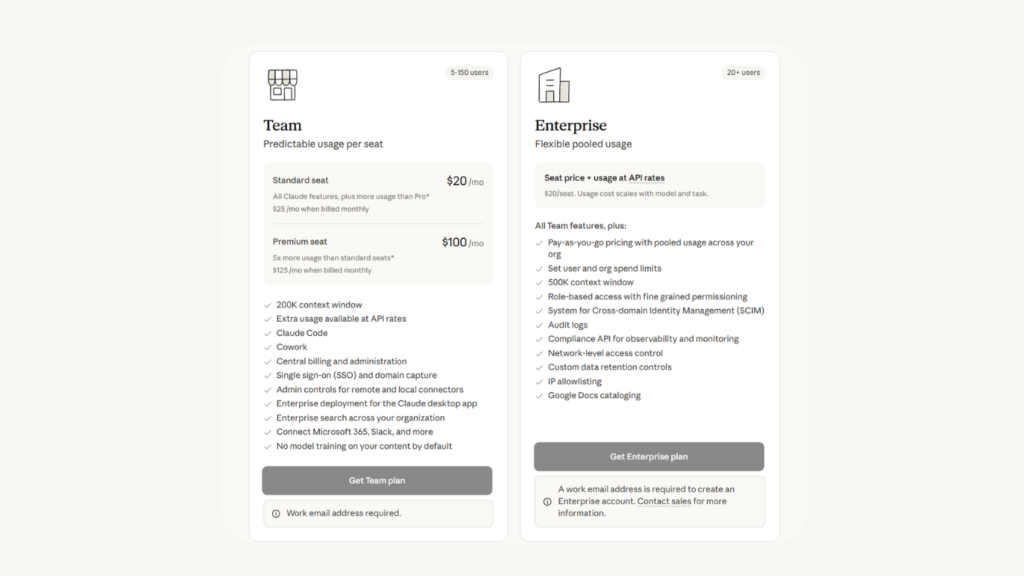
| Team | ~$25+/user/month | Small finance teams | Collaboration tools, admin controls |
| Enterprise | Custom pricing | Large organizations | Governance, compliance, dedicated support |
This structure allows professionals to scale their usage depending on how complex their Excel workflows become.
Free Plan — Entry-Level Access

The free tier allows users to explore Claude’s basic AI features but usually includes limited usage capacity.
Best suited for:
- Students or beginners
- Users testing Claude inside Excel
For serious finance workflows, most professionals eventually upgrade to a paid plan.
Pro Plan — Most Popular Choice for Professionals

The Pro plan is often the best starting point for individuals who want Claude for Excel.
Typical pricing ranges between $17 and $20 per month, depending on billing options.
Key benefits include:
- Access to Claude in Excel
- Higher AI usage limits
- Faster responses compared to free tier
Financial analysts and freelancers usually find this plan offers the strongest value for everyday work.
Max Plan — Built for Heavy Analytical Work

The Max plan targets advanced users running large financial models or performing deep analysis regularly.
Why users upgrade:
- Much higher usage allowances
- Priority processing during peak hours
- Better performance with complex Excel datasets
Although more expensive, it can significantly reduce manual analysis time.
Team Plan — Collaboration for Finance Departments
Organizations needing shared workflows often choose the Team plan.
Key advantages:
- Centralized billing
- Admin controls
- Collaboration across finance professionals
- Access to Claude for Excel across multiple users
This plan works well for FP&A teams and small financial departments managing reporting together.
Enterprise Pricing — Custom Deployment
Enterprise plans are tailored for large organizations requiring governance, security, and compliance features.
Typical enterprise benefits include:
- Role-based access control
- Advanced admin tools
- Organization-wide AI deployment
Because enterprise needs vary, pricing is negotiated individually.
What Affects Claude for Excel Pricing?
Several factors influence the total cost:
Usage Volume
Heavy AI workloads consume more resources, which may require upgrading to higher tiers.
Performance Needs
Premium plans often provide faster processing during high demand — important for deadline-driven finance teams.
Collaboration Requirements
Organizations with multiple analysts often find Team plans more cost-effective than individual subscriptions.
Is Claude for Excel Worth the Price?
For professionals who spend hours inside spreadsheets, the value often comes from saved time rather than subscription cost.
Claude for Excel helps users:
- analyze complex financial models
- explain formulas clearly
- maintain calculation logic
- speed up forecasting workflows
Even a mid-tier plan can reduce manual effort significantly.
Final Thoughts: Choosing the Right Claude for Excel Plan
Choosing the right plan depends on your workflow complexity.
- Use Free for learning and testing.
- Choose Pro for daily analytical work.
- Upgrade to Max for heavy financial modeling.
- Select Team or Enterprise if collaboration and governance are required.
Claude for Excel pricing is designed to scale alongside user needs — from individual analysts to enterprise finance teams adopting AI at scale.