
Budgeting is the backbone of every successful construction project. From estimating costs at the planning stage to tracking progress and forecasting completion, a well-structured budget ensures that projects stay profitable and on schedule.
Traditionally, construction companies have relied on Excel for budgeting — and for good reason. Excel offers flexibility, familiar formulas, and the ability to customize layouts for your exact needs. But as projects grow in complexity, manual budgeting in Excel can become slow, error-prone, and disconnected from real-time project data.
That’s where modern construction budgeting software like PivotXL comes in — bringing automation, live data integration, and forecasting capabilities directly into your Excel workflows. And in construction, that means it can power both your budgeting process and your Work-in-Progress (WIP) reporting.
How Budgeting is Actually Done in Construction
Not every construction firm budgets the same way — it largely depends on size, tools, and internal processes.
1. Spreadsheet-Driven Budgeting (Smaller & Mid-Sized Firms)
- Process:
- Finance or project managers create initial budgets in Excel.
- Cost estimates for labor, materials, and subcontractors are collected from various stakeholders.
- One person consolidates all inputs into a master file and updates forecasts manually.
- Challenges:
- Version chaos, risk of errors, and over-reliance on a single “spreadsheet owner.”
Budgeting Process in Excel – Step by Step
2. ERP-Based Budgeting (Larger Firms)
- Process:
- Budgets are entered and maintained directly in ERP systems like Viewpoint Spectrum, Sage 300 CRE, CMiC, or Procore (ERP-linked).
- One project accountant or controller updates budgets, while project managers submit change requests.
- Challenges:
- ERP reports can be rigid, making it hard to run “what-if” scenarios or customize outputs for bonding companies and executives.
3. The Hybrid Reality
Even ERP-heavy companies still rely on Excel for:
- Custom budget modeling.
- Multi-project roll-ups.
- WIP reporting in formats stakeholders actually use.
Manual vs. Automated Budgeting Process
Here’s how manual Excel budgeting compares to an automated process with PivotXL:
| Step | Manual in Excel | Automated with PivotXL |
|---|---|---|
| Data collection | Separate spreadsheets for each stakeholder | Connected templates linked to a central database |
| Roll-up to P&L | Manual copy-paste or SUM formulas | Instant roll-up across all inputs |
| Version control | Multiple file versions to track | Single source of truth with live updates |
| Adjusting forecasts | Manual formula edits in multiple files | One change updates all linked reports |
| WIP reporting | Built manually from exported job cost data | Live connection to job cost + automated CTC |
| Reporting & dashboards | Custom charts in each file | Pre-built dashboards that update automatically |
Why Construction Budgeting Needs Forecasting & Cost-to-Complete
In construction, budgeting isn’t just a one-time event. Forecasting and Cost-to-Complete (CTC) are critical to understanding whether a project will finish on time and within budget.
- Forecasting – Reflects the latest changes in labor rates, material prices, or schedules.
- Cost-to-Complete – Shows how much budget is required to finish a project based on current progress and committed costs.
When budgeting software integrates these functions, you can:
- Compare original budget vs. forecast vs. actuals in one place.
- Identify overruns early.
- Present clear WIP reports to bonding companies and owners.
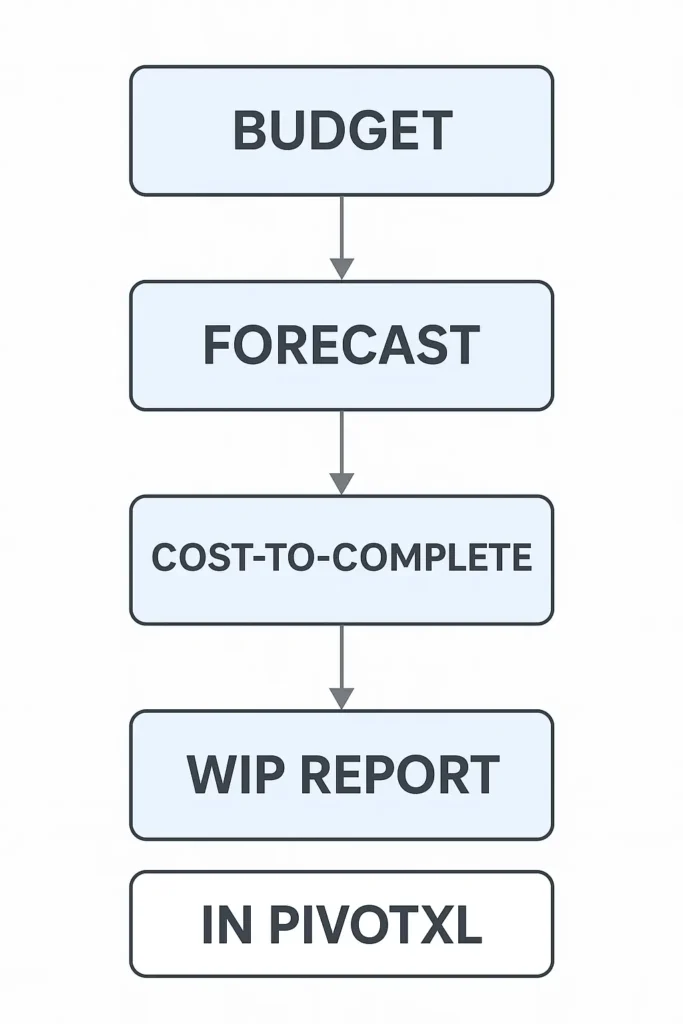
How PivotXL Combines Budgeting, Forecasting & WIP
PivotXL keeps the flexibility of Excel but adds the automation and data integration construction finance teams need.
With PivotXL, you can:
- Budget in Excel, Without the Version Chaos – Connected templates feed into a central database so all updates roll up instantly.
- Automate WIP Reporting – Pull live job cost data from ERP or accounting software, calculate CTC automatically, and generate formatted WIP reports on demand.
- Integrate Forecasting into the Budget – Adjust future costs and timelines, with changes instantly reflected in both the budget and WIP.
- Maintain a Single Source of Truth – Finance and operations work in the same live-connected Excel files, eliminating duplicate work.
WIP Reporting for Contractors in Excel
Final Word:
Whether your construction budgeting is spreadsheet-driven, ERP-managed, or somewhere in between, PivotXL bridges the gap — letting you keep Excel while automating both budgeting and WIP reporting.
Instead of fighting with files, your finance team can focus on tracking profitability, managing forecasts, and keeping projects on budget from start to finish.